
Cradlepoint Connectivity Overview
Below is a diagram of how a Cradlepoint router connects your store devices to the internet:
NOTE: Please also review this Sharepoint article to better understand the basic setup of your Cradlepoint router.
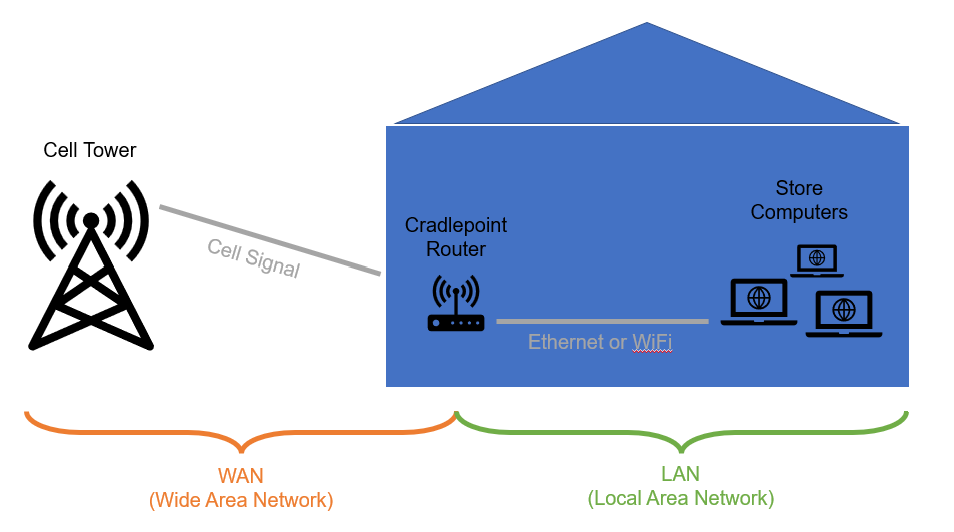
- Cradlepoint routers use cellular antennas to get an internet signal from cellular towers in the area. The part of the network is called the WAN (Wide Area Network). We primarily use T-Mobile, Verizon, and AT&T.
- The Cradlepoint manages that WAN connection and routes the internet traffic in and out to local computers that are connected to it, called a LAN (Local Area Network). LAN devices (our computers) can be connected to the router by Ethernet cable or WiFi
Troubleshooting
Step 1: Check Antenna Condition
99.9% of the time, sudden poor connectivity on a Cradlepoint is related to the condition of the cellular antennas. Make sure they are screwed on tight (hand tighten only). If you spin the antenna counter-clockwise and it immediately loosens or comes off, it needs to be tightened. Sometimes the antennas are broken. If they are, please contact IT and we will send new ones.
Step 2: Check Antenna Position
The cellular antennas MUST be in an alternating position. One antenna should be pointing up to the sky (bent at the elbow) and the other should be pointing straight out (no bend at the elbow). If the antennas are not positioned in this way, you will NOT get the best signal possible.
Step 3: Check Cradlepoint Position
If the antennas are tight and in the correct position, try moving the Cradlepoint to a location closer to a window, or a different part of the building. Other electronics and thick walls can interfere with the cellular signal. When possible, the Cradlepoint should be:
- Out in the open on a counter, table, shelf, or wall. It should NOT be on a shelf under the register(s). IT can provide aids to hand the device on a the wall, if needed
- In a safe spot where it will not be bumped or knocked over
- Away from customers, payment terminals, barcode scanners or other nearby highly-used spaces
Step 4: Reboot the Cradlepoint
These routers are complex computing devices. Sometimes, they need a reset just like a register or laptop. Power off the router using the switch on the back (near the power supply), count to 10, and turn it back on again.
Step 5: Consider a Signal Booster
When cellular connectivity is great outside the building, but very poor or non-existent inside, a signal booster can be good option. A booster brings the outdoor signal indoors by using an external antenna connected via cable inside to a booster device and internal antenna. Any cellular devices inside (Cradlepoint routers, mobile phones, and hotspots) can use that signal.
Below is a diagram of setup of a signal booster:
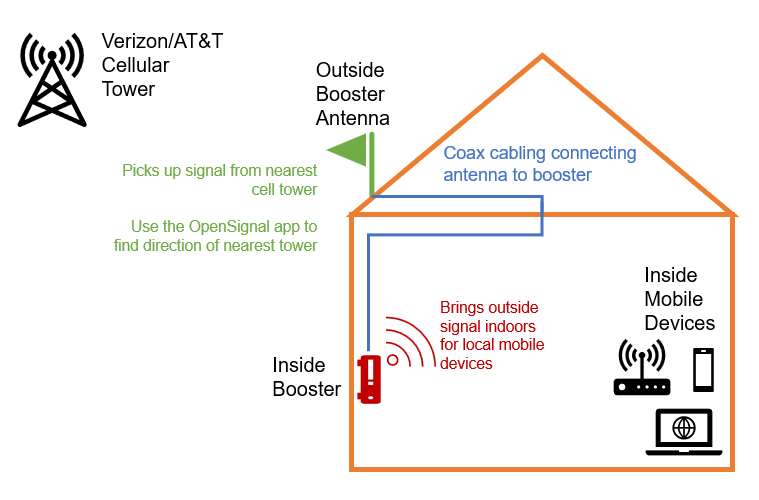
In most cases, we need the help of our partner's maintenance team to get these installed. However, we can contract with an outside network services provider if necessary. Boosters range from $200 to $1000 depending on the needs, setup, and size of the building.
Contact the IT department if you believe a booster will improve your internet connectivity
Comments
0 comments
Please sign in to leave a comment.